
Aetheris 1.4.0 and 1.4.1: faster resource switching, favorites, richer object detail and a maintainability pass
Aetheris 1.4.0 is out with a release focused on the parts of Kubernetes work that happen over and over again: switching between resources, returning to important objects, reading container resource usage, and keeping the app predictable across platforms. (1.4.1, a follow-up release that rounds out object detail and cleans up the codebase internally, is covered at the end of this post.)
The previous releases shaped the workspace and made the resource table faster. This one keeps pushing in that direction. Aetheris now does more to preserve context while you move around a cluster, and it gives frequently inspected objects a proper place in the interface.
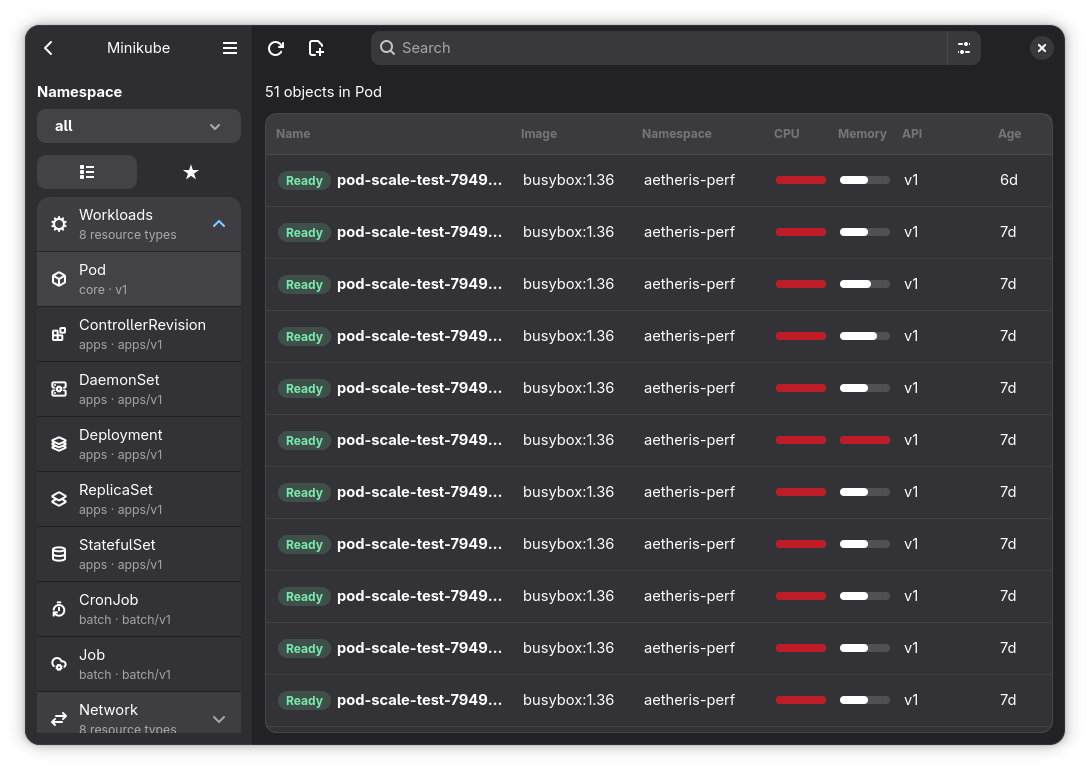
Resource lists that feel closer
Aetheris now keeps a small in-memory cache of recently loaded object lists. When you move between resources, namespaces or views, the app can immediately show the last known objects while it refreshes the live data in the background. That makes repeated navigation feel much less like starting over every time.
The cache is scoped by cluster context, resource type and namespace, so cached Pods from one namespace do not leak into another view. It is also cleared after mutating operations such as creating, applying, scaling, cordoning, draining or deleting objects. The intent is simple: keep the interface responsive without pretending stale data is authoritative.
Object loading also has a timeout now. If a cluster or API server stalls while listing a resource, Aetheris reports the problem instead of leaving the workspace in an indefinite loading state. When a cached list exists, the app can fall back to it while still surfacing the error.
Favorites for the objects you keep opening
Some Kubernetes objects become part of your working set: the Deployment you are tuning, the Pod you keep inspecting, the Service that anchors a stack, the Node you are debugging. Aetheris 1.4.0 adds favorite objects so those targets can be kept close.
The detail header now has a favorite action, and the sidebar can switch between the regular resource list and saved favorites. Favorites are stored with the cluster context, resource identity, namespace and object name, which keeps them precise even when different clusters contain objects with similar names.
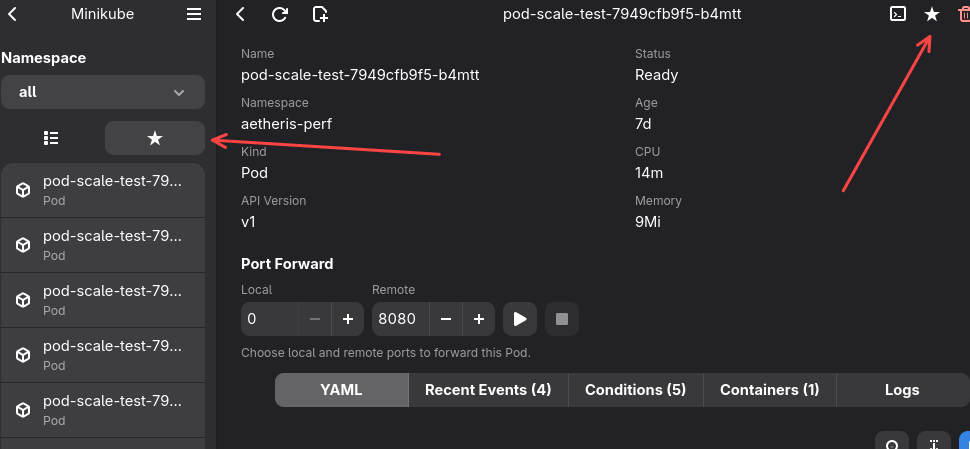
This release also expands the symbolic icon set used by the app. The new icons make resource groups and actions easier to scan without turning the interface into a wall of text.
Better status and metrics signal
The status filter now understands Available in addition to the existing
states such as Ready, Unavailable, Running, Pending and Failed. That
matters for Deployments that are not fully ready but still have available
replicas. Instead of collapsing those cases into a less useful state, Aetheris
can now present partial availability as its own signal.
Container metrics in the object detail view have also been reworked. Pod containers now show current usage alongside requests and limits in a compact row. CPU and memory are still formatted into human-friendly values, but the view is easier to read at a glance and keeps the raw relationship between current, request and limit close to the container name.
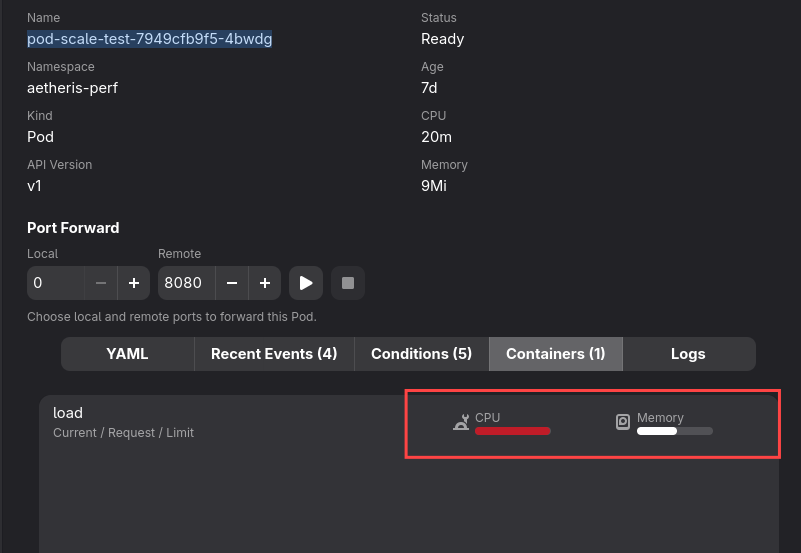
Behind that UI, Aetheris now reads resource requests and limits from regular, init and ephemeral containers. Pod detail loading also fetches summary metrics and per-container metrics together, which keeps the detail pane from doing more round trips than necessary.
Cleaner packaging
The Windows build now embeds application resources directly into the executable and ships with a dedicated Windows icon. That makes the packaged app feel more native on Windows while keeping the release workflow smaller and easier to maintain.
This release also removes the experimental OpenConnect integration. Aetheris is staying focused on being a native Kubernetes client: kubeconfig, projects, resources, YAML, logs, terminals and day-to-day cluster operations. Removing the unused VPN layer cuts maintenance surface and keeps the app’s boundaries clearer.
1.4.1: Deployment pod states, Service and Ingress detail
Aetheris 1.4.1
rounds out the object detail pane with information that was previously only
one kubectl describe away.
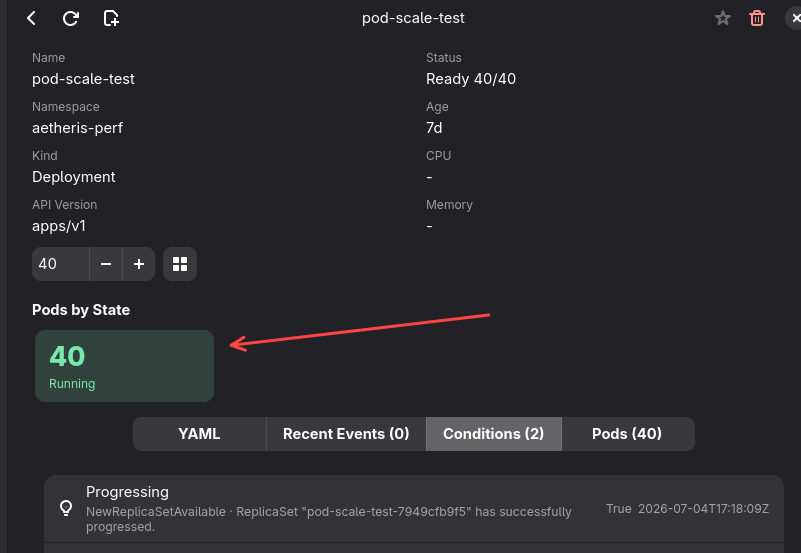
Opening a Deployment’s Pods tab now shows a small styled summary counting its Pods by lifecycle phase — Running, Pending, Succeeded, Failed and Unknown — before you scroll down to the individual Pod list. It’s a quick way to spot a Deployment that is stuck rolling out or has Pods crash-looping without reading every row.
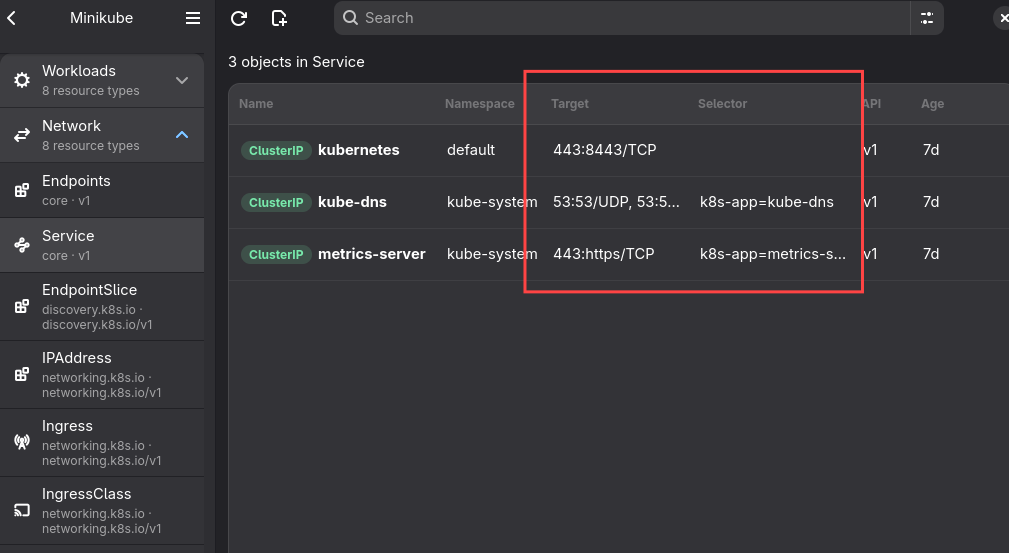
Services and Ingresses also get proper sections in the detail pane now. Services show their ports (name, protocol, port, target port and node port where set) and their label selector, so you can see at a glance which Pods a Service actually routes to. Ingresses show their routing rules — host, path, path type, and the backing Service and port each rule points at.
Under the hood: a maintainability pass
Alongside those features, 1.4.1 includes a purely internal refactor of the GTK4/Relm4 application layer, with no behavior change of its own. A handful of files had grown into single, multi-thousand-line modules mixing several responsibilities at once: message dispatch, application state, widget construction, YAML tooling, and streaming/terminal handling. Each of these was split into small, single-responsibility modules — the same pattern already used elsewhere in the codebase for the object detail view. Message handling, for instance, moved from one large dispatcher into one file per message domain (clusters, projects, namespaces, the object table, mutations, nodes, logs, terminals, port forwarding); application state and window construction were split the same way.
That part of the release was verified against the full test suite, linted, and smoke-tested by running the app, and exists solely so future features and fixes land faster and with smaller, easier-to-review changes.
Acknowledgements
Aetheris now explicitly credits Seabird, whose work helped inspire the project. Aetheris is still its own GNOME-native take on Kubernetes management, but it is important to acknowledge the tools and ideas that helped shape it.
If you use Aetheris as a daily Kubernetes workspace, 1.4.0 and 1.4.1 together should make the app feel quicker when moving around, clearer when reading Deployment, Pod, Service and Ingress details, and more comfortable when you keep returning to the same objects.