
Aurora Shell 50.11: a more natural dock, better capture tools and stronger foundations
Aurora Shell 50.11 is out for GNOME 50. This release makes several parts of the desktop feel more natural in daily use: the dock responds more carefully to pointer gestures, Capture Tools fits around GNOME’s own screenshot controls, the power menu feels more personal, and small interaction details in Clipboard History and Tray Icons are more consistent.
There is also a lot below the surface. Aurora Shell now has clearer ownership of timers, signals, actors and other GNOME Shell resources, a more focused test layout, and separate production and development packages. Those changes are less visible than a new animation, but they are what let a modular extension with 22 independent features remain predictable as it grows.
A dock that reacts with more intention
The dock receives the largest visible polish in 50.11. New hover and press effects give icons a little more physical feedback without changing how the dock works. The effect can be disabled, and its intensity can be set to Subtle, Balanced or Expressive in Aurora Shell’s preferences. The default is deliberately restrained.
The more important work is in when the dock decides to appear. Hitting a screen edge is not always a request to reveal it: the pointer may be in the middle of a drag or another gesture that merely crosses the activation area. Aurora Shell now suppresses those accidental reveals while still recognizing contextual edge drags where showing the dock is useful.
Intellihide has been tightened as well. Picture-in-Picture windows stay above regular windows and remain visible across workspaces, but no longer confuse the dock’s smart-reveal decision. Batched window updates now replace pending work cleanly, preventing old timeouts from surviving long enough to make the dock react to stale state.
Taken together, these changes make the dock less eager, more stable and easier to read through motion. It should appear because you asked for it, not because the pointer happened to pass through the wrong pixel.
Your account in the power menu
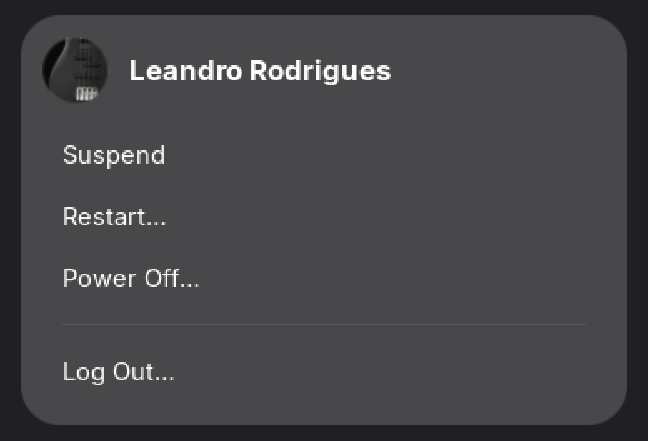
Aurora Shell now adds the current user’s avatar and name to GNOME’s power menu. It is a small module with a simple purpose: make the system menu feel connected to the signed-in account while keeping the existing power, lock and session actions where users expect them.
Like every Aurora Shell feature, Power Menu Avatar can be toggled independently from the preferences window. It also follows the same lifecycle rules as the rest of the extension, restoring GNOME’s original menu when the module is disabled.
Capture Tools stays clear of GNOME’s controls
Capture Tools already brings drawing, shapes, text, numbered annotations and optional local Tesseract OCR directly into GNOME’s screenshot interface. In 50.11, the integration is more considerate of the interface around it.
The floating toolbar now chooses its position deterministically and stays clear of GNOME’s native screenshot controls. Annotations can be moved after they are placed, making it easier to correct a composition without starting over. When switching from a screenshot to a screen recording, pointer capture is enabled at the right time so the native workflow continues to behave as expected.
Internally, screenshot hooks, toolbar behavior, placement and OCR sessions are now separate components. For users, the result is straightforward: the tools feel more integrated and are less likely to compete with the UI they extend.
Smaller fixes that keep the desktop coherent
Clipboard History cards now preserve their focus and action behavior more consistently. Moving the pointer away from a pinned item reveals the appropriate actions, inactive pins are rendered as passive badges, and short cards keep a stable height instead of shifting the panel around.
Tray Icons also has one shared fallback for applications that do not provide a usable icon. SNI items, background applications and other tray paths now fall back to the same generic executable symbol, so a missing icon produces a consistent result instead of depending on which path created the item.
The Vela VPN Quick Settings integration is now disabled by default, including its GNOME Shell fallback. It remains available for people who use Vela, but a fresh Aurora Shell installation will not intercept VPN activation until the module is explicitly enabled. This keeps an integration with an optional external service properly opt-in.
Stronger module boundaries
Aurora Shell 50.11 includes a broad internal refactor of its largest features. The dock, tray, Capture Tools, Clipboard History, Aurora Menu, Meeting Clock, Icon Weave and shared Dash code have been split into smaller components with clear responsibility for their own actors, signal connections, cancellables, timeouts and teardown.
That matters in GNOME Shell, where an extension is enabled, disabled, unlocked and re-enabled inside a long-running desktop process. A resource left behind by one lifecycle can become a duplicate callback, stale actor or unexpected state the next time a module starts. The new structure makes those ownership rules explicit and adds coverage for replacement, cleanup and reentrant disposal.
The extension runtime and test access are cleaner too. Unit and Shell tests now mirror the source domains, build and packaging automation has been split into focused scripts, and GNOME Extensions review requirements are checked as part of the project policy. This release also addresses findings from the extension review tooling and removes developer-only hooks from the production entry point.
Production for users, development for testing
The 50.11 release ships two archives:
- The regular
shell-extension.zipis the production build recommended for normal installations. - The
development.shell-extension.zipbuild includes Aurora’s in-Shell DevTool for contributors and focused QA.
Keeping those packages separate means regular users receive only the extension they need, while contributors can still inspect modules and exercise test scenarios without maintaining a private build.
Aurora Shell 50.11 is a release about refinement in both senses of the word: the visible details are calmer and more deliberate, and the code underneath is better prepared for the next set of modules. If you use Aurora Shell on GNOME 50, this update should feel familiar immediately — just smoother at the edges.